creative
‍

PORTFOLIO

Design Solutions
Project Management
eCommerce

About ME.

I am a seasoned digital operations professional with over 5 years of experience in designing and implementing user-friendly platforms for sales, inventory, and order processing. I am proficient in platforms such as WordPress, Shopify, WooCommerce, and Elementor, and I have a deep understanding of their integration with third-party tools such as Google Tag Manager, Google Analytics, Facebook Event Manager, QuickBooks, and SendGrid. My expertise lies in designing and executing strategies that optimize user experience and enable seamless data collection for audience targeting and analysis. I am dedicated to providing exceptional customer service and delivering results that exceed expectations. With a keen eye for detail and a passion for innovation, I am always seeking new ways to improve performance and drive revenue growth for my clients.

UX/UI Solutions
Custom Integrations
Responsive Design
Strategies
Tracking
Marketing Campaigns

Web Design

Promotional Campaigns
Landing Pages
Custom Integrations

Website Samples

PROJECTS

#01

Sales Platform

Summary

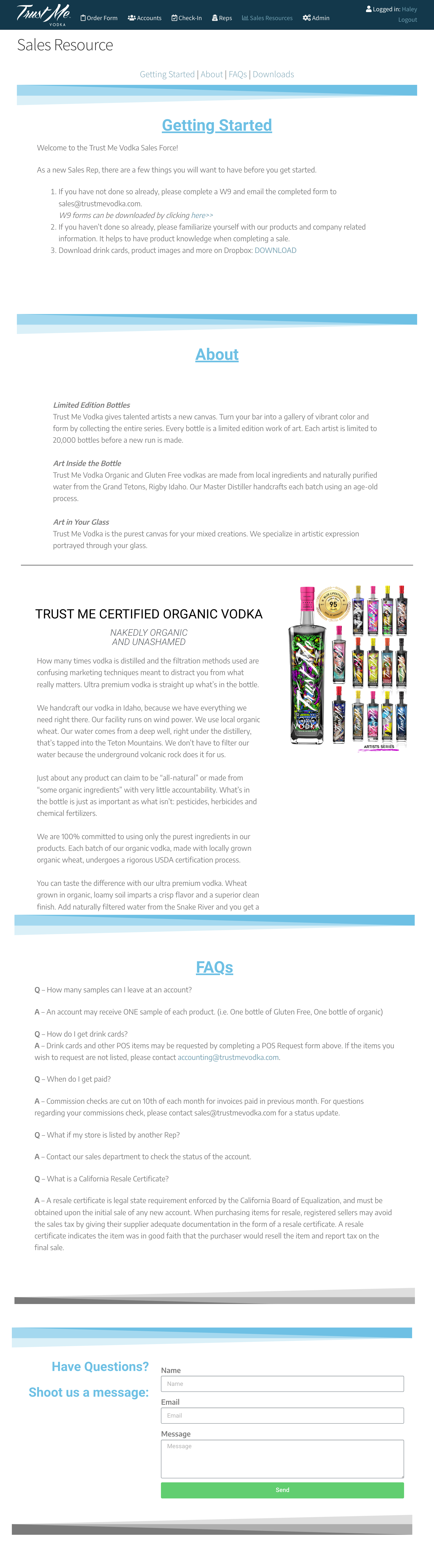
The objective of this project is to design a user-friendly platform that allows representatives and participating D2C customers to place sales orders, process payments, track customer notes, edit customer data, upload documents, generate invoices, manage live inventory for multiple warehouses, link warehouse inventories to selected distributors, and deplete indicated amounts from new purchase orders. Additionally, the platform will sync invoice and inventory data into QuickBooks via a custom API.

Strategy

1. Import all customers from QuickBooks into WordPress and assign unique user IDs for each account.
2. Design a customer profile page and enable warehouse options for inventory management.
3. Design a variable storefront compatible with different user permissions such as Sales Reps, Distributors, and Merchants.
4. Create variable products and product pricing based on user permission.
5. Enable inventory locations and assign standard and custom warehouses for all products to ensure that inventory levels are depleted upon processing customer orders.
6. Design an invoicing template and generate a PDF upon each new order. Automatically generate a copy and send it to the customer upon processing the order.
7. Enable a custom Web Asset Connector via QuickBooks web services tools to sync new orders from the sales platform directly into QuickBooks and map customer and order fields to corresponding fields in QuickBooks.
8. Display active customer store locations from the sales platform onto front facing customer website via Google Console APIs.

Platforms: WordPress, WooCommerce, DocuSign, SendGrid, Square, ShippingEasy, QuickBooks, and Google Analytics.

By implementing this strategy, the platform will enable representatives and D2C customers to easily manage their orders, inventory, and customer data. The system will also streamline administrative tasks such as invoicing and syncing data with QuickBooks, improving overall efficiency and accuracy.


Shareholder Platform

#02

Summary

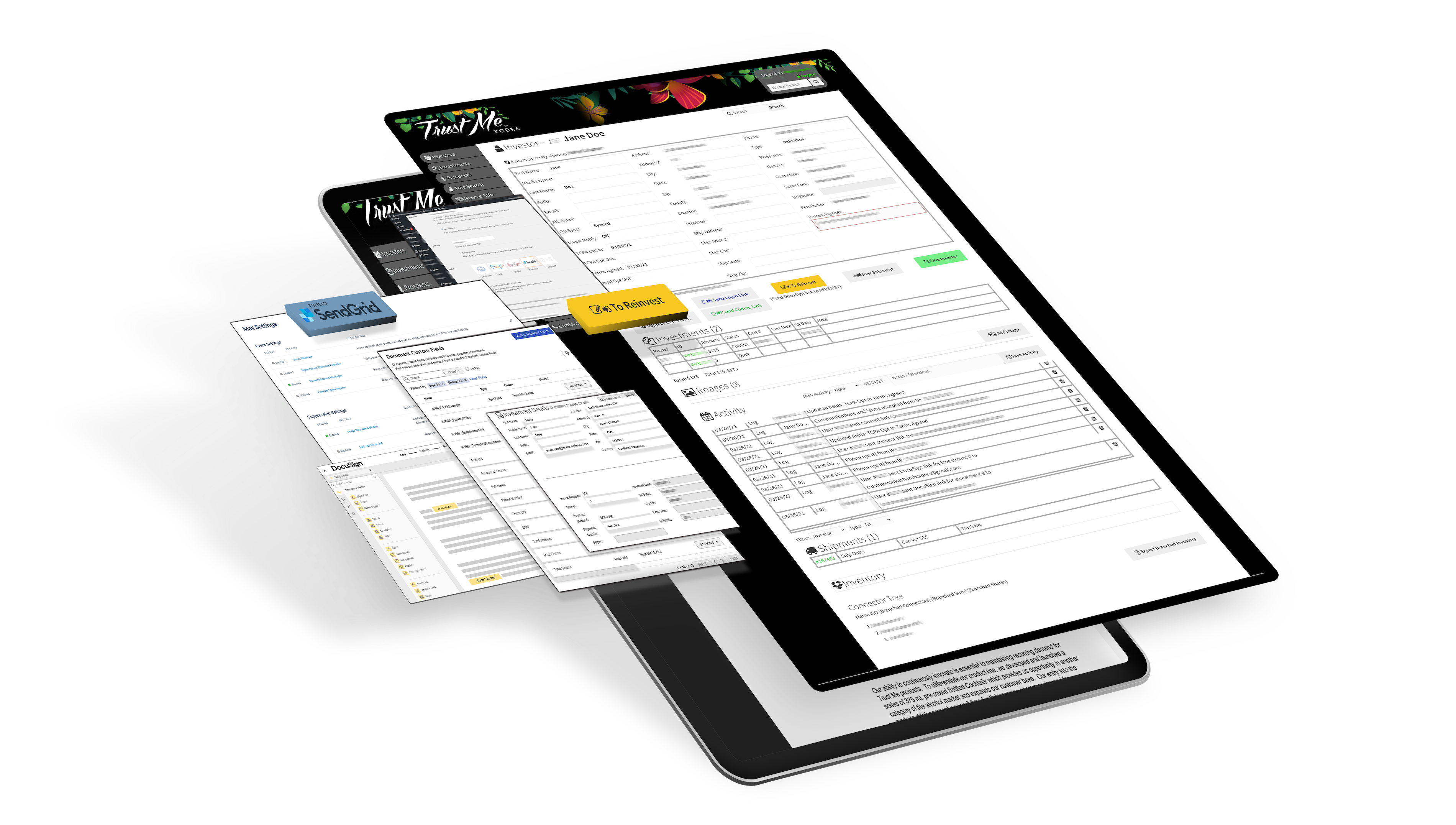
Create User Friendly all-in-one platform that serves as a functional internal database for administrative processing. In addition, enable services for users to review investment overview, implement DocuSign API for users to re-invest directly from the platform, process electronic payment and processing for incoming investments, import & map DocuSign fields to corresponding fields on database to generate unique investors, map and generate existing user ID's to corresponding user profile & generate ready-to-print documents collected from API documentation for administrative processing, generate pick tickets and shipping labels via shipping easy API directly from User Profile, track user and investment related activity & documents within user profile, map transactional data via web data connector into QuickBooks for quick and efficient data entry.

Strategy

1. Connect SendGrid SMTP to the Shareholder Database and Access Portal WordPress-based website via SendGrid API.
2. Connect DocuSign API to SendGrid server and enable custom fields to map investor (user) data to SendGrid.
3. Enable webhook to map DocuSign custom fields from SendGrid to WordPress.
4. Capture data fields into WordPress site utilizing WooCommerce "orders" feature to store investment data.
5. Process payment for all incoming investment “orders” through WooCommerce via Square API.
6. Outline data mapping fields using "if-then" output conditions. (i.e. If data fields match existing username and email fields in WordPress Database, map DocuSign fields captured and register new investments under existing user ID. If data fields do not match existing username and email fields, register new investors using DocuSign data fields and create new investment under the new user using the DocuSign data fields.)
7. Enable 'Status' feature to flag new incoming investments for administrative review and processing.
8. Enable a custom Web Asset Connector via QuickBooks web services tools to sync new investments from the database directly into QuickBooks and map user and order fields to corresponding fields in QuickBooks.
9. Enable Shipping services for all new investments via ShippingEasy API tool that in turn will generate Pick ticket, and shipping label directly from the user profile page on database.
10. Display useful user resource pages such as FAQ’s, Financial Updates, Video updates and more from the main menu.
‍
Platforms: WordPress, WooCommerce, DocuSign, SendGrid, Square, ShippingEasy, QuickBooks, Google Analytics

By implementing this strategy, the platform can seamlessly integrate with existing internal systems, capture and store important data, and automate administrative tasks to improve overall efficiency and user experience.

#03

D2C UX

Summary

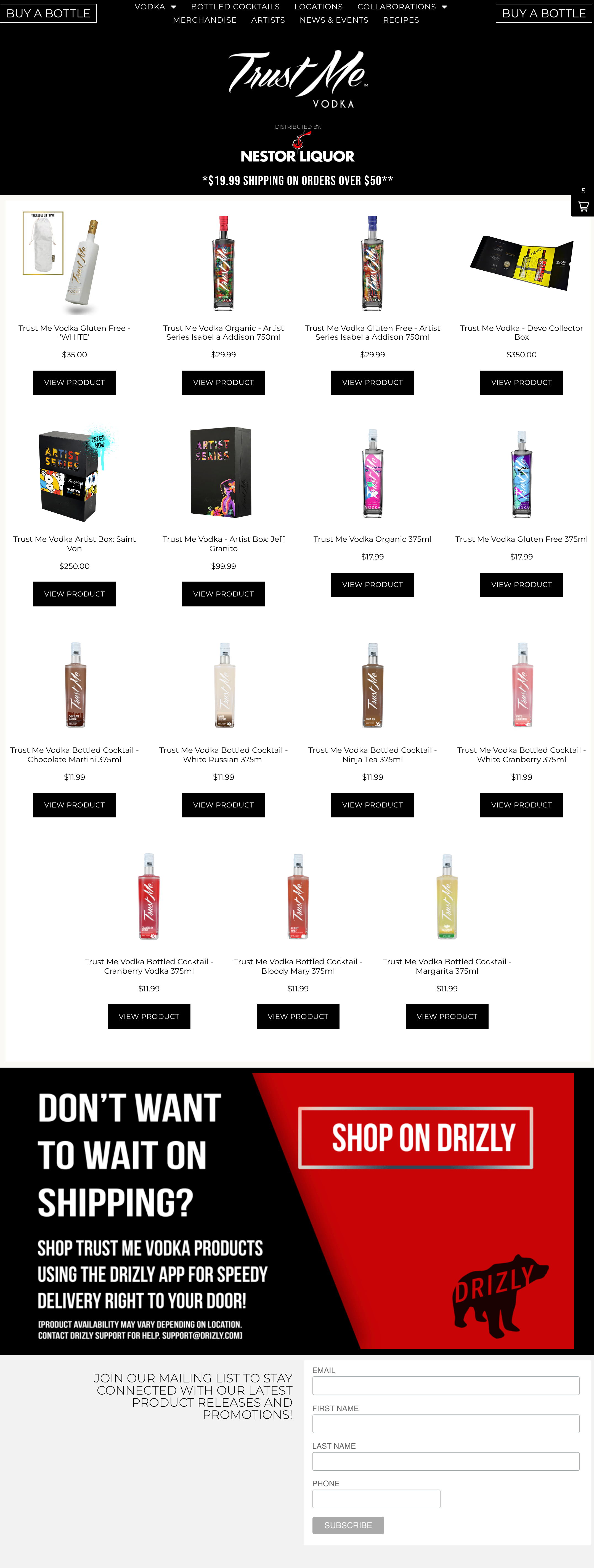
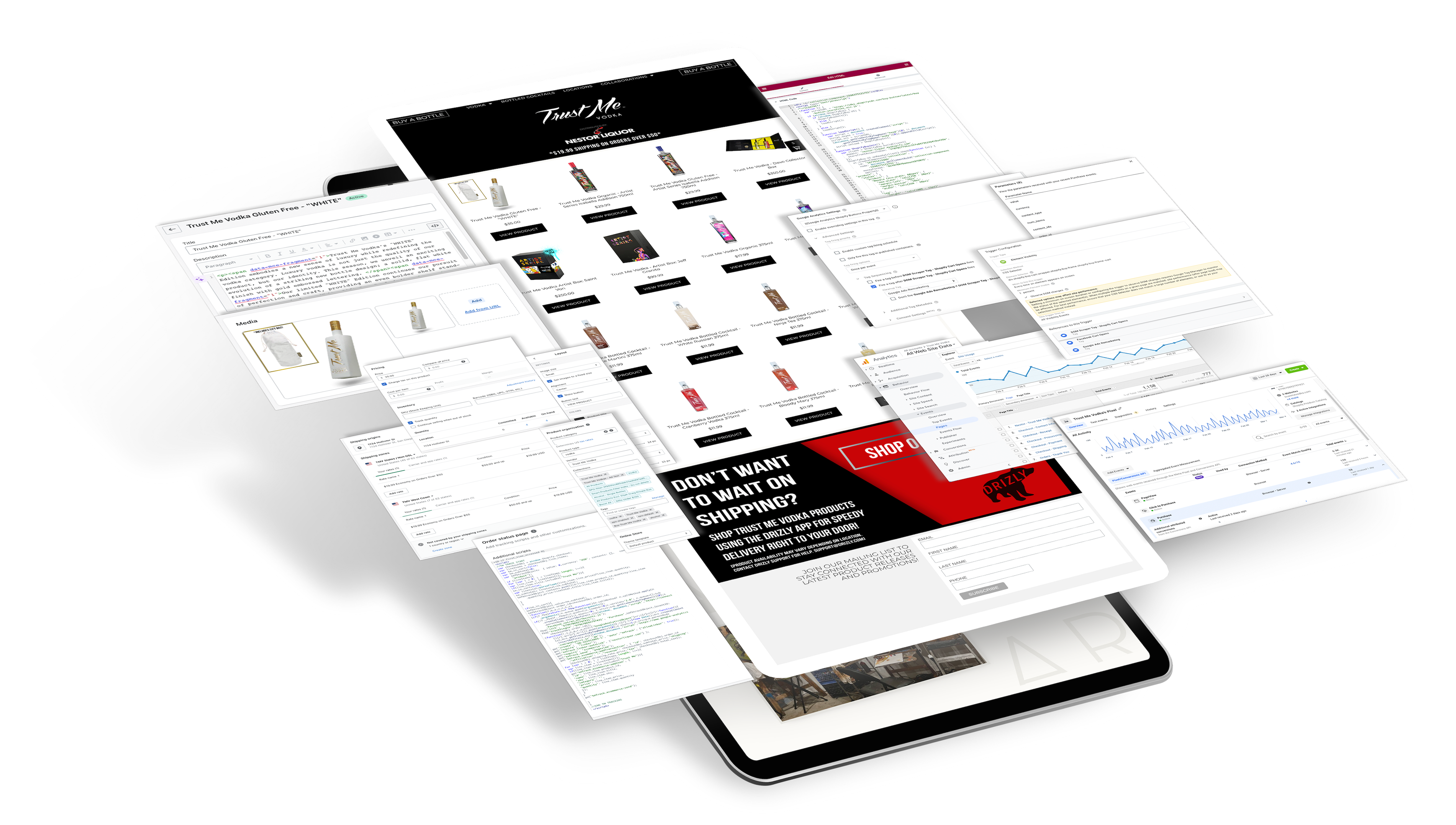
The objective of this project is to create a user-friendly shopping experience for customers to purchase Client's products and maintain California Alcohol and Beverage Control legal compliance by funneling transactions through a third-party retailer's storefront. Additionally, data collection events and triggers will be implemented to retain transactional data for audience targeting and analysis.

Strategy

1. Establish a B2B partnership with a third-party retailer and enable partner access to their storefront for ease of access, product management, and implementation.
2. Add all Trust Me Vodka product SKUs to the third-party retailer's Shopify product collection.
3. Create a product catalog (group) on the third-party retailer's Shopify product collections featuring only Client's products.
4. Create and implement Facebook Events via Facebook Pixel and Google Tag Events via Google Tag Manager to track user events and map to Google Analytics for data collection and analysis.
5. Add GTM and FB tracking codes to the third-party retailer's Shopify checkout to funnel transactional data from the retailer’s website into Client’s Google and Facebook Event analytics.
6. Use the Shopify "Buy Button" plugin to generate a JavaScript product catalog and implement it on Client's customer-facing WordPress website.
7. Measure website and campaign performance via GTM and FB Events.
‍
Platforms: Shopify, WordPress, Google Tag Manager, Google Analytics, and Facebook Event Manager.

By implementing this strategy, the platform will provide a seamless shopping experience for customers while also complying with California Alcohol and Beverage Control regulations. The data collection events and triggers will enable audience targeting and analysis, while continuously measuring performance will provide valuable insights for ongoing optimization.

Projects

#01

Shareholder Platform

Summary

Create User Friendly all-in-one platform that serves as a functional internal database for administrative processing. In addition, enable services for users to review investment overview, implement DocuSign API for users to re-invest directly from the platform, process electronic payment and processing for incoming investments, import & map DocuSign fields to corresponding fields on database to generate unique investors, map and generate existing user ID's to corresponding user profile & generate ready-to-print documents collected from API documentation for administrative processing, generate pick tickets and shipping labels via shipping easy API directly from User Profile, track user and investment related activity & documents within user profile, map transactional data via web data connector into QuickBooks for quick and efficient data entry.

Strategy

1. Connect SendGrid SMTP to the Shareholder Database and Access Portal WordPress-based website via SendGrid API.
2. Connect DocuSign API to SendGrid server and enable custom fields to map investor (user) data to SendGrid.
3. Enable webhook to map DocuSign custom fields from SendGrid to WordPress.
4. Capture data fields into WordPress site utilizing WooCommerce "orders" feature to store investment data.
5. Process payment for all incoming investment “orders” through WooCommerce via Square API.
6. Outline data mapping fields using "if-then" output conditions. (i.e. If data fields match existing username and email fields in WordPress Database, map DocuSign fields captured and register new investments under existing user ID. If data fields do not match existing username and email fields, register new investors using DocuSign data fields and create new investment under the new user using the DocuSign data fields.)
7. Enable 'Status' feature to flag new incoming investments for administrative review and processing.
8. Enable a custom Web Asset Connector via QuickBooks web services tools to sync new investments from the database directly into QuickBooks and map user and order fields to corresponding fields in QuickBooks.
9. Enable Shipping services for all new investments via ShippingEasy API tool that in turn will generate Pick ticket, and shipping label directly from the user profile page on database.
10. Display useful user resource pages such as FAQ’s, Financial Updates, Video updates and more from the main menu.
‍
Platforms: WordPress, WooCommerce, DocuSign, SendGrid, Square, ShippingEasy, QuickBooks, Google Analytics

By implementing this strategy, the platform can seamlessly integrate with existing internal systems, capture and store important data, and automate administrative tasks to improve overall efficiency and user experience.

#02

D2C Storefront

Summary

The objective of this project is to create a user-friendly shopping experience for customers to purchase Client's products and maintain California Alcohol and Beverage Control legal compliance by funneling transactions through a third-party retailer's storefront. Additionally, data collection events and triggers will be implemented to retain transactional data for audience targeting and analysis.

Strategy

1. Establish a B2B partnership with a third-party retailer and enable partner access to their storefront for ease of access, product management, and implementation.
2. Add all Trust Me Vodka product SKUs to the third-party retailer's Shopify product collection.
3. Create a product catalog (group) on the third-party retailer's Shopify product collections featuring only Client's products.
4. Create and implement Facebook Events via Facebook Pixel and Google Tag Events via Google Tag Manager to track user events and map to Google Analytics for data collection and analysis.
5. Add GTM and FB tracking codes to the third-party retailer's Shopify checkout to funnel transactional data from the retailer’s website into Client’s Google and Facebook Event analytics.
6. Use the Shopify "Buy Button" plugin to generate a JavaScript product catalog and implement it on Client's customer-facing WordPress website.
7. Measure website and campaign performance via GTM and FB Events.
‍
Platforms: Shopify, WordPress, Google Tag Manager, Google Analytics, and Facebook Event Manager.

By implementing this strategy, the platform will provide a seamless shopping experience for customers while also complying with California Alcohol and Beverage Control regulations. The data collection events and triggers will enable audience targeting and analysis, while continuously measuring performance will provide valuable insights for ongoing optimization.

#03

Sales Platform

Summary

The objective of this project is to design a user-friendly platform that allows representatives and participating D2C customers to place sales orders, process payments, track customer notes, edit customer data, upload documents, generate invoices, manage live inventory for multiple warehouses, link warehouse inventories to selected distributors, and deplete indicated amounts from new purchase orders. Additionally, the platform will sync invoice and inventory data into QuickBooks via a custom API.

Strategy

1. Import all customers from QuickBooks into WordPress and assign unique user IDs for each account.
2. Design a customer profile page and enable warehouse options for inventory management.
3. Design a variable storefront compatible with different user permissions such as Sales Reps, Distributors, and Merchants.
4. Create variable products and product pricing based on user permission.
5. Enable inventory locations and assign standard and custom warehouses for all products to ensure that inventory levels are depleted upon processing customer orders.
6. Design an invoicing template and generate a PDF upon each new order. Automatically generate a copy and send it to the customer upon processing the order.
7. Enable a custom Web Asset Connector via QuickBooks web services tools to sync new orders from the sales platform directly into QuickBooks and map customer and order fields to corresponding fields in QuickBooks.
8. Display active customer store locations from the sales platform onto front facing customer website via Google Console APIs.

Platforms: WordPress, WooCommerce, DocuSign, SendGrid, Square, ShippingEasy, QuickBooks, and Google Analytics.

By implementing this strategy, the platform will enable representatives and D2C customers to easily manage their orders, inventory, and customer data. The system will also streamline administrative tasks such as invoicing and syncing data with QuickBooks, improving overall efficiency and accuracy.

Get In Touch!

Thank you! Your submission has been received!
Oops! Something went wrong while submitting the form.